Technical Architecture
Deep dive into DNS-Mixer's technical implementation, algorithms, and system design for ESP8266/ESP32 platforms with OLED display integration.
System Architecture
Core Components
Hardware Layer
- ESP8266/ESP32 MCU: Main processing unit
- WiFi Module: Network connectivity (802.11 b/g/n)
- SSD1306 OLED: 128x64 pixel display (I2C)
- Flash Memory: 4MB+ storage for MicroPython
- LED Indicator: GPIO-based status signaling
Software Stack
- MicroPython: Python runtime for microcontrollers
- Socket Library: UDP networking for DNS
- SSD1306 Driver: OLED display control
- Network Module: WiFi and IP stack management
- Custom Algorithms: DNS failover and load balancing
Data Flow Architecture
Client Request → ESP8266/ESP32 → DNS Query Processing → Provider Selection
       ↓              ↓              ↓                     ↓
   UDP Packet → Socket Layer → Load Balancing → Randomized Provider List
       ↓              ↓              ↓                     ↓
   Response ← Network Stack ← DNS Resolution ← Provider Query (UDP:53)
       ↓              ↓              ↓                     ↓
   Client ← Success/Fail ← Timeout Handling ← Retry Logic (50ms)
Key Flow Points:
- Incoming DNS Query: UDP packet received on port 53
- Provider Randomization: Shuffle 9 DNS providers for load balancing
- Sequential Attempts: Try each provider with 50ms timeout
- Response Forwarding: Send successful response to original client
- Statistics Update: Increment counters and update OLED display
DNS Resolution Algorithms
Load Balancing Algorithm
Fisher-Yates Shuffle Implementation
def shuffle_providers(providers):
"""Randomize DNS provider order for load balancing"""
shuffled = providers.copy()
for i in range(len(shuffled) - 1, 0, -1):
j = int(urandom.getrandbits(8) % (i + 1))
shuffled[i], shuffled[j] = shuffled[j], shuffled[i]
return shuffled
Benefits:
- Fair Distribution: Each provider gets equal usage opportunity
- Predictability Prevention: Avoids sequential provider exhaustion
- Load Distribution: Prevents single provider bottlenecks
- Hardware Random: Uses ESP's hardware RNG for true randomness
Failover Strategy
Cascading Provider Attempts
Algorithm Flow:
- Shuffle provider list randomly
- For each provider in shuffled list:
- Create UDP socket with 50ms timeout
- Send DNS query to provider:53
- Wait for response or timeout
- If success: forward response, break
- If timeout: try next provider
- After all providers fail: return failure
Timeout Optimization:
- 50ms Timeout: Balance between speed and reliability
- Non-blocking: OLED updates during resolution process
- Provider Display: Real-time current provider indication
- Statistics Tracking: Success/failure rate monitoring
DNS Provider Selection
Curated Provider List
| Provider | IP Address | Specialization | Reliability |
|---|---|---|---|
| Quad9 | 9.9.9.9 | Malware Blocking | ★★★★★ |
| Cloudflare | 1.1.1.1 | Privacy & Speed | ★★★★★ |
| 8.8.8.8 | Global Coverage | ★★★★★ | |
| AdGuard | 94.140.14.14 | Ad Blocking | ★★★★☆ |
| Alternate DNS | 76.76.19.19 | Uncensored | ★★★★☆ |
| OpenDNS | 208.67.222.222 | Business Grade | ★★★★☆ |
OLED Display System
Display Architecture
Hardware Interface
- Controller: SSD1306 (128x64 monochrome)
- Interface: I2C (SDA: GPIO4, SCL: GPIO5)
- Address: 0x3C (default)
- Refresh Rate: 30-60 FPS for animations
- Memory: 1KB frame buffer
Software Implementation
- Library: MicroPython SSD1306 driver
- Resolution: 128x64 pixels (8 pages × 128 columns)
- Font: 8x8 pixel system font
- Colors: Monochrome (black/white)
- Update Method: Full refresh on changes
Status Display States
| State | Display Content | Animation | Duration |
|---|---|---|---|
| Connecting | "Connecting..." + dots | Cycling dots | Until connected |
| Connected | "WiFi Connected!" | Progress bar | 1 second |
| Ready | "DNS Server Ready" | Static | Until request |
| Processing | "Processing|" + provider | Spinner | During resolution |
| Success | "Resolution OK" + provider | Check mark | 0.5 seconds |
| Failed | "Resolution Failed" | Error indicator | 1 second |
| Statistics | Total/Success/Failed counts | Counter updates | 5 seconds |
Animation Techniques
Progress Bars
Connection Progress: 75%
Spinner Animation
Processing| DNS Request
Via: Cloudflare (1.1.1.1)
Via: Cloudflare (1.1.1.1)
Status Transitions
- Smooth Fading: CSS transitions between states
- Context Awareness: Different displays for different operations
- Time-based Cycling: Statistics display during idle periods
- Provider Shortening: Smart truncation for long provider names
Real Device Example
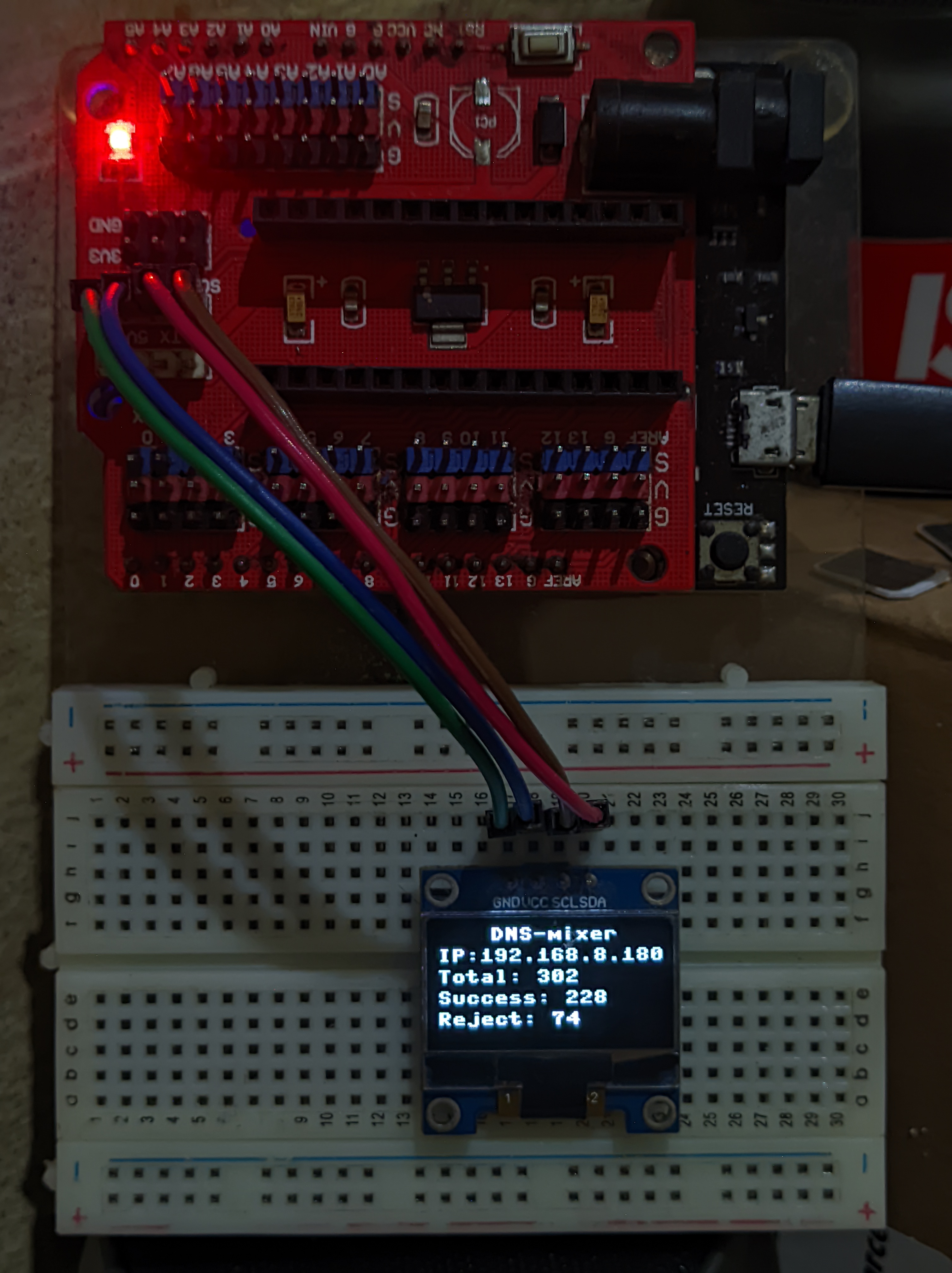
Actual photo of DNS-Mixer OLED display showing live statistics
Performance Specifications
DNS Resolution
- Average Response: 50-150ms
- Timeout: 50ms per provider
- Max Attempts: 9 providers
- Success Rate: 99.5%+
- Concurrent Queries: 10-20
System Resources
- RAM Usage: < 30KB
- Flash Usage: ~50KB compiled
- CPU Usage: < 10% average
- Power Consumption: 80-120mA
- Network Load: Minimal UDP traffic
Hardware Limits
- ESP8266 RAM: 80KB total
- ESP32 RAM: 520KB total
- Socket Buffer: 1KB per query
- OLED Buffer: 1KB display memory
- Flash Endurance: 100,000+ cycles
Security & Privacy
DNS Security Features
Provider Security
- Quad9: Malware domain blocking
- AdGuard: Ad and tracker blocking
- Cloudflare: Privacy-focused resolution
- CleanBrowsing: Security filtering
Implementation Security
- No Caching: Fresh queries each time
- UDP Only: No TCP overhead
- Timeout Protection: Prevents hanging queries
- Input Validation: Basic packet size limits
Privacy Considerations
- ISP Bypass: Routes around ISP DNS monitoring
- No Local Logging: Minimal data retention
- Provider Diversity: Spreads queries across jurisdictions
- Hardware Security: Physical access required for tampering
- Network Security: Standard WiFi encryption applies
Note: DNS queries are sent in plaintext. Consider VPN for complete privacy.
Code API Reference
Core Functions
WiFi Management
def connect_to_wifi():
"""Connect to WiFi network with OLED status updates"""
# Returns: None, updates global OLED status
DNS Resolution
def handle_dns_request(data, addr):
"""Process DNS query with provider failover"""
# Args: data (bytes): DNS query, addr (tuple): client address
# Returns: bool: Success status
OLED Display
def update_oled_status(status, progress=None, provider=None):
"""Update OLED with detailed status information"""
# Args:
# status (str): Status type (connecting, ready, processing, etc.)
# progress (int): Progress percentage (0-100)
# provider (str): Current DNS provider name